
Orange Cloud for Cloudflare logo

Orange Cloud for Cloudflare

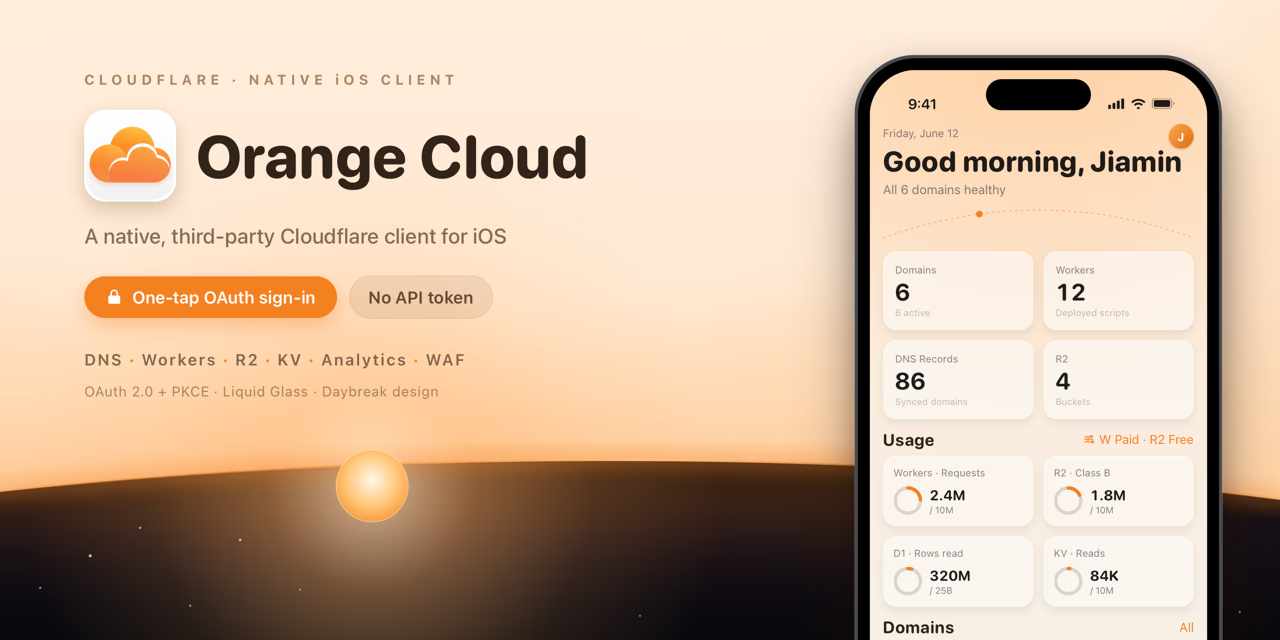
Native iOS Cloudflare client. OAuth login—no token paste. Manage DNS, Workers, R2/D1/KV, WAF & analytics on the go.

Orange Cloud for Cloudflare Introduction

Orange Cloud is a native iOS client for managing your Cloudflare infrastructure. Unlike tools that require manually copying and pasting API tokens, Orange Cloud uses Cloudflare's official OAuth 2.0 + PKCE authorization flow—the same login experience as Cloudflare's own apps. All tokens are stored in the system Keychain and never touch your clipboard.

Manage multiple accounts side by side and switch between them instantly. Feature coverage spans the entire Cloudflare stack: full CRUD for Zones & DNS, Workers inspection with real-time Tail logs (WebSocket), R2 object browser, D1 SQL console, KV key-value editor, WAF custom rule toggling, Tunnel status monitoring, and traffic analytics charts powered by the Cloudflare GraphQL API (rendered with Swift Charts).

Deeply integrated with the iOS ecosystem: home screen Widgets with a dynamic dawn-to-dusk design, Dynamic Island Live Activity for streaming Tail logs, Control Center ControlWidget, Siri Shortcuts & App Intents, and CoreSpotlight indexing of your Zones and DNS records. Built on an iOS 17 baseline with progressive enhancements on iOS 18 / 26 / 27—Liquid Glass, adaptive sidebar navigation, and zoom transitions.

Free tier covers one account with full Zone/DNS access, 24 h analytics, and all Widgets. Pro unlocks multiple accounts, full storage features, Workers Tail, WAF, Tunnel management, and extended analytics.

Key Features

  • One-tap OAuth 2.0 + PKCE login — no API token copy-paste required
  • Multi-account support with instant one-tap account switching
  • Full CRUD for Zones and DNS records across all record types
  • Workers inspection with real-time WebSocket Tail log streaming
  • R2 object browser, D1 SQL console, KV key-value read/write/delete
  • WAF custom rule viewing and toggling (zone-waf.write gated)
  • Cloudflare Tunnel status and active connection monitoring
  • GraphQL-powered traffic analytics with Swift Charts visualizations
  • Home screen Widgets with dynamic dawn-to-dusk design (S / M / L sizes)
  • Siri Shortcuts, App Intents, and CoreSpotlight search integration
  • Dynamic Island Live Activity for real-time Worker Tail logs
  • Full CRUD for Cloudflare Snippets (edge JavaScript)

Use Cases

  • Emergency DNS failover in the middle of the night — flip A records from your phone without opening a laptop
  • Debug a serverless function on the go with live Workers Tail streaming
  • Hot-update feature flags via KV console without redeployment
  • Pull up 24 h / 7 d / 30 d traffic analytics charts during a meeting or investor call
  • Quickly block an abusive IP or disable a misfiring WAF rule without touching the dashboard
  • Ask Siri 'Check example.com status' to surface Zone health at a glance
  • Glance at Zone status across all accounts from Control Center without unlocking your phone

Why Startups Use It

Most early-stage startups run their entire infrastructure on Cloudflare—domains, CDN, Workers serverless functions, R2 object storage, D1 databases. But Cloudflare Dashboard is web-only: when an alert fires at 2 AM or you need to flip a DNS record while boarding a flight, reaching for a laptop is the only option. Orange Cloud closes that gap: Respond anywhere: flip DNS, hot-update KV values, toggle WAF rules, or check Worker logs from your iPhone—no laptop required. Zero token risk: OAuth PKCE authorization means no API token to share, store in Slack, or accidentally commit. Permissions are granted per-scope using least privilege. Team-friendly: multiple account support lets the CTO and infrastructure engineer each log in with their own Cloudflare credentials independently. Real-time observability: Workers Tail streams live logs directly to your phone; traffic analytics charts surface request spikes before they become incidents. Low cost to start: the free tier covers every core need for an early-stage team. Pro is a lightweight monthly upgrade—no enterprise contract required.

Frequently Asked Questions

Is my Cloudflare API token stored securely?

Orange Cloud never asks for your API token. It uses Cloudflare's official OAuth 2.0 + PKCE flow, so authorization is handled entirely by Cloudflare's own login page. The resulting access and refresh tokens are stored exclusively in the iOS Keychain—never in UserDefaults or any plaintext storage.

Can I manage multiple Cloudflare accounts?

Yes. You can log in to multiple Cloudflare accounts simultaneously. Each account's tokens are stored independently in the Keychain, and switching between accounts is instant. Pro subscription required for more than one account.

What is the difference between the Free and Pro tiers?

Free covers one account with full Zone/DNS access, 24-hour traffic analytics, all Widgets, and Siri Shortcuts. Pro unlocks multiple accounts, full storage features (R2/D1/KV), real-time Workers Tail logs, WAF rule management, Tunnel monitoring, and extended 7-day and 30-day analytics.

What Cloudflare permissions does the app request?

During login you choose exactly which permission scopes to grant—nothing is requested without your consent. The minimum useful scope is dns.read for basic Zone and DNS browsing. Advanced features like Workers Tail or WAF rule editing require their respective scopes, and the app automatically shows or hides feature entry points based on what you've granted.

Which iOS versions are supported?

iOS 17.0 and above. The app progressively enhances on iOS 18, iOS 26 (released September 2025), and iOS 27 (beta, June 2026), adding Liquid Glass materials, adaptive sidebar navigation, and zoom transition animations on supported devices.

Is Orange Cloud open source?

Yes, under AGPL-3.0 + Commons Clause dual licensing. Self-compiled builds get all Pro features unlocked via the OPENSOURCE_UNLOCKED build flag. Note that the official OAuth Client ID is reserved for official builds; self-builders need to register their own OAuth app in the Cloudflare Dashboard.

Do Widgets and Live Activities require extra setup?

No setup needed. After signing in, the app automatically shares data snapshots via App Group. Just add a Widget from the home screen library. Live Activities start automatically when you open a Workers Tail session and appear in the Dynamic Island and on the Lock Screen.

More About Orange Cloud for Cloudflare

Pricing
Paid
Listed Date
Jul 06, 2026
Authority Badge

Add our badge to your website to showcase product credibility and listing status.

Listed on MF8.BIZ
Featured List